Showing posts with label guest articles. Show all posts

Monday, August 8, 2011

Powerful Titles for Your Blog Posts


New guest article on Instantshift.

Titles and headings have the difficult intent of sum up the whole article content in a few words. Those words have to be attractive, eye-catching, tell the story and transmit curiosity to invite the reader in continuing his reading.
Are your titles powerful? Are they able to stick the readers? Do they let your posts coming out from crowd link list?
Writing effective headlines is a skill that is essential and that any writers should be able to manage. Articles, website contents, presentation, either on the Web or for printing, need to be titled. Even more, long texts need to be fragmented to let an easier scanning reading to the user. Here is where headings are important.


Which words are better? How to say them well?
The aim of this post is giving you some tips about how to successful create effective headings for your written projects.

Go to Instantshift to read the whole article >>

Thursday, August 4, 2011

Creating a Juice Ad Poster + 3 Filter Forge Licenses Giveaway

New guest article on Onextrapixel, a tutorial with a small surprise...a giveaway from Filter Forge!

Photoshop is a great tool to create scenarios that can be successfully used for poster advertising. The use of Filter Forge 2.0 and its great collection of available filters gives you even more power and flexibility in creating what you want by bringing your creativity to life.

In today’s tutorial, we will combine a couple of stock images and some interesting effects from Filter Forge to create a refreshing juice ad in Photoshop. You’ll learn how to deal with Filter Forge effects and stock images and create elements to match for a brilliant highly professional advertising result.
In addition to that Filter Forge has kindly provided us 3 x Free Basic Edition Licenses of Filter Forge (worth $149 each) to win with this giveaway for our readers community.

Let’s get started and see how to select and compose a successful portfolio.

Go to Onextrapixel to read the whole article >>

Tuesday, July 19, 2011

How to Prepare a Well-Focused Graphic Design Portfolio


New guest article on Instantshift, this time dedicated to how to prepare a well-focused graphic design portfolio.

A graphic designer has to take care of its portfolio because it is the way in which he presents his abilities. The portfolio is a collected sample which showcases your creativity and ability and you need to submit it properly to your public.
Potential employers or clients may read it and what they see can help them to decide whether they want to hire you. That’s why a good presentation has to be properly built up.
Along this article we will analyze which samples are better and how to arrange them, we will see example of both online and printed portfolio and how to present them to potential customers/employers.

Let’s get started and see how to select and compose a successful portfolio.

Go to Instantshift to read the whole article >>

Monday, June 20, 2011

Good Creative Brief for Better Customers


New guest article on Instantshift.
A good brief is the very first step for a satisfying creative project and this is true for both, the designer and the customer. It is the mile stone to ensure to the designer working with the right kind of customers and to the customer having best result and high professionalism.
I’ve started this article by saying in the title “Good Brief for Better Customers”. What does it means?
Every designer doesn’t matter if specialized for the web, for printing or more focused in creating identities or packaging, hopes to work with good customers. But what “good customer” means? A famous name?An high budget? An interesting and challenging project? Sure all of these points and many others.

Go to Instantshift to read the whole article >>

Wednesday, June 8, 2011

PSDFAN Guest Article: Grunge Splotches Photoshop Brush Set

This premium brush set contains 10 quality Photoshop brushes of grunge splotches. Each brush is hugely detailed, and is sure to add a professional touch to your work.
Each brush is super high-res, at around 1000-2500px.
 

Thursday, May 26, 2011

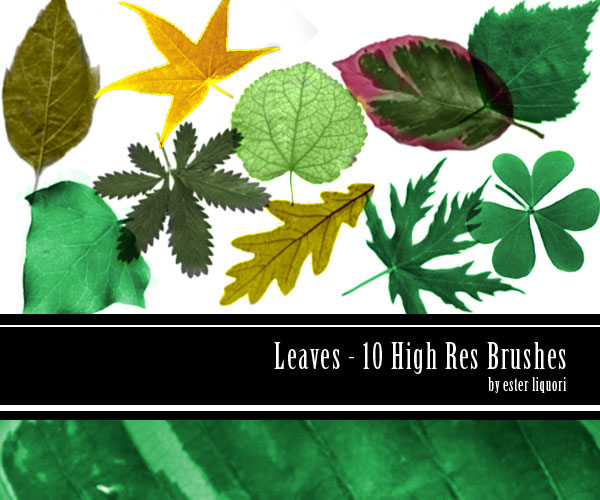
Guest Article: Photoshop Leaves Brush-Set

This premium brush set contains 10 quality Photoshop brushes of leaves. Each brush is hugely detailed, and is sure to add a professional touch to your work.
Each brush is super high-res, at around 1000-2500px.
 

Thursday, May 19, 2011

Guest Article on Instantshift: How to Create a Small Business Card Size Calendar

New guest article on Instantshift, this time dedicated to how to ensuring long life to your business card in your customers' pocket.
You can make memorable your logo and your company in many ways. You can prepare gadget for your customers, beautiful business card for new meeting but, depending on your business activity, in my opinion, one of the best way to promote your business card is having a small calendar printed on the back.
The business card is intended to be hold in a purse or in a wallet, making a beautiful and eye-catching business card size calendar you will be sure that it will be kept and used. This kind of business card is particularly suitable for commercial activity as beautiful centers or restaurant where business card are left on the entrance desk, free and available to anyone. An annual calendar ensures a long time use of the business card.
Let’s get started and see how to prepare a small business card size calendar by yourself.

Go to Instantshift to read the whole article >>

Friday, May 13, 2011

PSDFAN Guest Article: Vectorize a Landscape Photo Into a Watercolor Painting


I live in Turin (Italy) and the Mole is the symbol of this city. Rome has Colosseo, London the Big Ben whereas Turin has the Mole. It is a very good subject to use, vectorized, to decorate this city’s merchandising items. 
A city skyscraper is a must to do as merchandising subject for mug and t-shirt. The image may need several sizes and needs to retain it’s detail so a vector is the most suitable kind of file to use.
Follow this walkthrough on how to turn a landscape photo in an elegant watercolor painting like vector. The procedure, as usual, is just one of the thousand applications that you may found for the same technique. 
Well start by adjusting in a suitable way the photo in Photoshop and we will go ahead to get a sketchy figure skyline, fully detailed vector. For this purpose we will be using Adobe Illustrator.
    Go to PSDFAN to read the whole article >>

    Sunday, May 8, 2011

    Guest Article: Spot or Process Color? Essential Guidelines

    New guest article on Instantshift, this time dedicated to difference between Spots and Process Color, with a particular attention in Illustartor platform. When you create a color swatch with Illustrator you may need to know some easy settings which the software proposes. Particularly the difference between Spot Color and Process Color is really important for a good printing result. Moreover, properly choosing the type of color between these greatly affect the final costs of the printing whole process. In this article we will see which options are the best for the job, why, how to properly manage Illustrator Swatch Options window, color options and book library.

    Go to Instantshift to read the whole article >>

    Tuesday, April 26, 2011

    Guest Article on InstantShift: Mind Mapping: Scheme to Improve the Creativity Process

    New guest article on Instantshift, this time dedicated to the use of Mind Mapping in the creativity workflow.
    Mind Maps are useful tools which allow you to create a scheme from fuzzy ideas, organize, and prioritize making visual connections. They may help the productivity in the creativity process giving an order to the chaos.
    As practical example in the article I've created a mind map about an Italian Worldwide famous coffee brand, Lavazza, showing all cultural and environment patterns which have contributed to its institutional website developing.

    Monday, April 11, 2011

    Guest Article on InstantShift: Create a Cute Bunny Character for Chinese New Year

    New guest article on Instantshift, this time dedicated to the Chinese Year of the Rabbit.

    With this tutorial I will show you how to create a cute bunny with Illustrator. The character is perfect to start the year because the 2011 is the Year of the Rabbit in the Chinese calendar. If you are not bunny lover don’t worry! The same technique could be useful to reproduce any other character or vector element you may want to do.

    This tutorial is of intermediate level. Technique used is not really difficult but the complete process is long. That’s why it will require about 4-5 hours to be accomplished.

    We will divide the tutorial in two parts: one about the bunny characters the other about the 2011 writing.

    Tuesday, April 5, 2011

    PSDFAN Guest Article: Office High-Res Photoshop Brush Set


    This premium brush set contains 10 quality Photoshop brushes. Each brush is hugely detailed, and is sure to add a professional touch to your work.
    Each brush is super high-res, at around 1000-2500px.
     

    Wednesday, March 9, 2011

    PSDFAN Guest Article: Create a Print-Ready Business Card in Illustrator

    This tutorial is very in depth, and covers design techniques listed below:
    • Learn how to correctly prepare your document and workflow for print before starting work.
    • Learn how to manipulate patterns/textures to create your own awesome custom designs.
    • Learn how to integrate lighting effects to add focus and clarity to your design.
    • Learn how to get your final design completely ready for the printers! Very useful tips here.
    • & Much More!
    Go to PSDFAN and subscribe the member area to read the whole article >>

    Blog Archive